
Download ZIP Extractor – Chrome Apps, Google Drive, ZIP Extractor
Overview
ZIP Extractor is a lightweight desktop utility designed to simplify the process of unzipping files stored in Google Drive. The software enables users to extract compressed archives directly from their cloud storage, eliminating the need to download files locally before decompression. This functionality is particularly useful for individuals and teams managing large volumes of archived data in a collaborative environment. By allowing selective extraction, the tool empowers users to retrieve only the files they need, reducing unnecessary data transfer and storage usage.
Targeted at professionals and everyday users who rely on Google Drive for file sharing and storage, ZIP Extractor streamlines workflows involving compressed documents, software packages, or media files. The tool integrates seamlessly with the Google ecosystem, making it ideal for users already invested in Chrome-based workflows. Real-world use cases include project teams extracting specific assets from shared ZIPs, educators distributing course materials, and remote workers accessing archived files without cluttering their local drives.
Developed by Google LLC, the software benefits from the reliability and security standards associated with the company’s products. As part of the Chrome Apps suite, it leverages the robust infrastructure of the Google ecosystem, ensuring consistent performance across supported platforms. The developer did not provide additional system requirements, and exact performance details were not specified.
Key Features & Capabilities
- Direct extraction from Google Drive – Users can unzip files stored in their Google Drive without downloading them first, saving time and bandwidth.
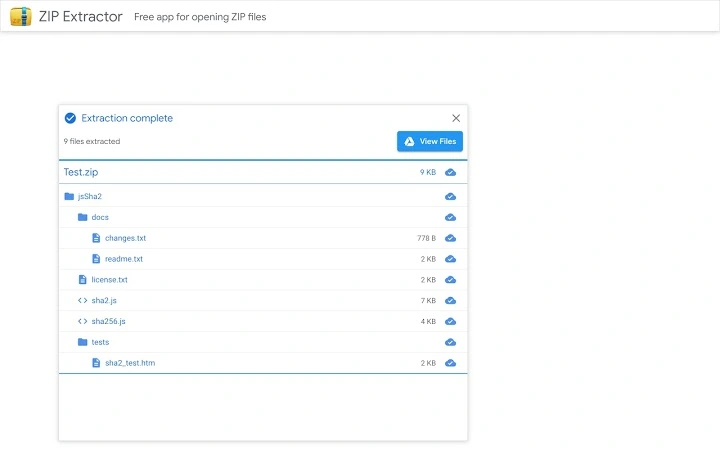
- Selective file extraction – The tool allows users to choose specific files within a ZIP archive for extraction, enabling efficient management of large archives.
- Seamless integration with Google Chrome – Designed as a Chrome App, it operates within the familiar Chrome environment, ensuring easy access and consistent UI behavior.
- Cloud-based file management – Extracted files can be shared directly with others, maintaining continuity within collaborative workflows.
- Support for standard ZIP format – The utility handles common ZIP files, making it compatible with files created by most compression tools.
These features are especially beneficial for users managing shared projects, where only specific components of a compressed package are needed. For example, a graphic designer can extract only image assets from a project ZIP without downloading the entire archive. Similarly, a team leader can extract configuration files from a software package and share them with developers without exposing unrelated data.
User Interface, Workflow & Performance
The user interface of ZIP Extractor follows the minimalist design principles typical of Chrome Apps, featuring a clean layout with intuitive navigation. The main window displays the list of ZIP files available in Google Drive, allowing users to browse and select the archive they wish to extract. A simple file picker enables selection of individual files within the archive, with a clear confirmation prompt before extraction begins.
Workflow efficiency is enhanced by the tool’s direct cloud-to-extraction process. Users avoid the intermediate step of downloading and manually extracting, reducing the number of actions required to access content. The interface is responsive, and navigation remains consistent across supported platforms, although detailed performance metrics were not provided by the developer.
General performance observations suggest stable operation under typical usage conditions. The developer did not specify resource usage details, so CPU and RAM behavior cannot be confirmed. However, as a lightweight utility with no background processes, it is expected to have minimal impact on system performance. Stability is likely maintained through integration with the Chrome runtime environment, which handles updates and error management.
Compatibility & System Requirements
ZIP Extractor is compatible with both Windows and Mac operating systems, ensuring broad accessibility across personal and professional environments. The software is distributed as a Chrome App, meaning it runs within the Google Chrome browser environment, which must be installed and properly configured on the user’s device.
The installation size is 5.3 MB, indicating a compact footprint that requires minimal disk space. The software version is 1.0, and the release date is 2024-05-21. Exact system requirements were not listed, and compatibility information was partially provided. Users are advised to ensure their system meets the baseline requirements for running Google Chrome, as the app depends on the browser’s runtime.
Pros and Cons
Pros
- Direct extraction from Google Drive without local downloads
- Support for selective file extraction within ZIP archives
- Lightweight size (5.3 MB) with minimal system impact
- Seamless integration with Google Chrome and Google Drive
- Free to download and use with no hidden costs
Cons
- Requires Google Chrome to be installed and active
- Limited to ZIP file format; no support for RAR, 7Z, or other archive types
- Dependent on Google’s cloud infrastructure and account access
- Platform support restricted to Windows and Mac only
- No offline functionality; internet connection required for operation
FAQ Section
Is ZIP Extractor available for all operating systems?
ZIP Extractor is currently available for Windows and Mac operating systems. It is not supported on Linux or other platforms.
Can I use ZIP Extractor without a Google account?
No, the software requires access to a Google account to connect with Google Drive and perform file extraction tasks.
Does ZIP Extractor support file formats other than ZIP?
Based on available information, the tool is designed to handle standard ZIP archives only. Support for other formats such as RAR, 7Z, or TAR is not included.
Is the software secure and safe to use?
As a Google LLC-developed application, ZIP Extractor benefits from the company’s security protocols and is distributed through official channels. Users are advised to only use the app from verified sources.
Can I update ZIP Extractor automatically?
Updates are managed through the Google Chrome browser. When a new version is available, it will be automatically installed if the app is enabled and Chrome is up to date.
Final Thoughts + CTA
ZIP Extractor offers a streamlined solution for users who frequently work with compressed files in Google Drive. Its ability to extract archives directly from the cloud, combined with selective file access, makes it a valuable tool for professionals and teams seeking efficiency in file management. While its functionality is limited to ZIP files and requires an active internet connection, the benefits of reduced download times and improved workflow integration are significant.
For anyone relying on Google Drive for collaboration and file sharing, this free desktop utility provides a practical and secure way to handle compressed data. The integration with Chrome and Google’s trusted ecosystem further enhances its reliability. If you need a fast, no-frills tool to unzip files in the cloud, ZIP Extractor delivers on its core promise.
Download ZIP Extractor now







